A DataGalaxy Catalog integration can be configured to synchronize dictionaries, usages, data products, and other defined workspace elements with DataGalaxy Portfolio instances.
It is possible to do so via Admin settings > Integration.
Troubleshoot the DataGalaxy Catalog Synchronization
Set Up DataGalaxy Portfolio
- Open Admin settings > Integration, create a new integration, and give it a name, such as DataGalaxy Catalog Integration.
- Generate an API token and copy its value. Unless there is a very specific need, the DataGalaxy Catalog connector token must be chosen preferentially with no expiration date.The token will never be accessible again, so copy the value in a secure place.
- Send the API token to the DataGalaxy Portfolio team.
- Let the DataGalaxy Portfolio team redeploy your application with this information and activate a feature flag.
- Create or have these concepts on DataGalaxy Portfolio : (mandatory) A concept representing the DataGalaxy instance you want to map, which must have an
External keyfield.
Set Up DataGalaxy Catalog
The integration requires a DataGalaxy Catalog token. Instructions for creating the token are available in this documentation.
How Does Synchronization Work?
Create Objects
DataGalaxy Catalog → DataGalaxy Portfolio
- Trigger: Every X minutes.
- Action: the connector creates the DataGalaxy Portfolio instance from the mapping and fills in the fields mapped in the connector configuration.
DataGalaxy Portfolio → DataGalaxy Catalog
- Trigger: a DataGalaxy Portfolio instance belongs to a concept mapped to a DataGalaxy Catalog object with a non-flat configuration, and has a name, a technical name, and, when applicable, a parent and a type.
- Embedded-by or association n-1 field (if applicable). If this field is filled, the instance is considered embedded under its parent. If not filled, the instance can be considered a first-class object (top-level).
- A type (as an association n-1 with DataGalaxy Catalog field :
EntityType), only for dictionary types (containers, structure,…) and multiple DataGalaxy Catalog concepts synchronized to a single DataGalaxy Portfolio concept
- If any required element is missing, the connector does not create the instance in DataGalaxy Catalog.
- Action: the connector creates the DataGalaxy Catalog instance and fills in the attributes mapped in the connector configuration.
Update Objects
DataGalaxy Catalog → DataGalaxy Portfolio
- Trigger: Every X minutes (see polling).
- Action: the connector updates the DataGalaxy Portfolio instance from the mapping and fills in the mapped fields.
DataGalaxy Portfolio → DataGalaxy Catalog
- Trigger: a mapped field is updated in DataGalaxy Portfolio.
- Action: the connector updates the DataGalaxy Catalog instance and fills in the mapped attributes.
Not all attributes are editable on DataGalaxy Catalog. See details here.
Delete Objects
DataGalaxy Catalog → DataGalaxy Portfolio
Nothing happens. The instance is simply no longer synchronized.
DataGalaxy Portfolio → DataGalaxy Catalog
Deleting a mapped instance in DataGalaxy Portfolio triggers one of the following actions:
- If
makeObsoleteInsteadOfDeletingistrue(the default), the connector sets the DataGalaxy Catalog instance's status toObsolete. It does not remove the instance.
- If
makeObsoleteInsteadOfDeletingisfalse, the connector deletes the DataGalaxy Catalog instance.
Restart the Connector
The connector restarts when the DataGalaxy Portfolio application restarts or when the JSON configuration changes. On connector restart, we re-fetch all DataGalaxy Catalog instances that are in mapped projects.
Configure the Connector
Create the JSON Configuration
Create a JSON configuration like the example below. Each part is described in the following sections.
Example JSON configuration:
{
  "apiUrl": "https://url.api.datagalaxy.com",
  "credentials": {
    "token": "myIntegrationTokenOrPersonalToken"
  },
  "polling": {
    "cron": "0 23 * * *", //Synchronization done every day at 23:00
    "timezone": "Europe/Paris",
    "forceSyncOnConfigurationUpdate": true
  },
  "configuration": {
    "notObsoleteContainer": {
      "name": "Container",
      "type": "flat-dictionary",
      "workspace": "workspaceId",
      "workspaceVersionId": "workspaceVersionId",
      "dataType": "containers",
      "containers": {
        "filters": [ //All filters will be applied as AND filters
          {
            "attribute": "EntityStatus",
            "condition": "NOT_EQUALS", // EQUALS, NOT_EQUALS, IS_NOT_EMPTY or IS_EMPTY
            "value": "Obsolete"
          },
          {
            "attribute": "Stewards", // Multi-value relation attribute
            "condition": "CONTAIN", // CONTAIN, CONTAIN_SOME, DO_NOT_CONTAIN, EQUALS, NOT_EQUALS, IS_NOT_EMPTY or IS_EMPTY
            "value": ["admin@datagalaxy.com"]
          }
        ],
        "linkFilters": [
          {
            "attribute": "IsOutputPortFor",
            "condition": "IS_NOT_EMPTY"
          },
          {
            "attribute": "IsInputOf",
            "condition": "CONTAIN",
            "value": ["81d51f02-c0f1-4460-a2b0-4672d1177ff4:81d51f02-c0f1-4460-a2b0-4672d1177ff4"]
          }
        ],
        "attributes": [ //Optional, if no configuration is mapped all attributes will be added to the mapping. As DataGalaxy Catalog has a lot of attributes, it is recommended to filter them.
          {
            "key": "DisplayName",
            "label": "Name", //Optional, if empty the Attribute name will be used
            "mode": "sync" //sync/read/write,
          },
          {
            "key": "TechnicalName",
            "label": "Technical Name",
            "mode": "write"
          }
        ]
      }
    },
    "notObsoleteReport": {
      "name": "Report",
      "type": "usages",
      "workspace": "workspaceId",
      "usages": {
        "attributes": [ //Optional, if no configuration is mapped all attributes will be added to the mapping. As DataGalaxy Catalog has a lot of fields, it is recommended to filter them.
          {
            "key": "DisplayName",
            "label": "Name", //Optional, if empty the Attribute name will be used
            "mode": "sync" //sync/read/write,
          },
          {
            "key": "TechnicalName",
            "label": "Technical Name",
            "mode": "read"
          }
        ]
      }
    }
  }
}
In this example, synchronization runs every day at 23:00 (Paris time). The connector combines all filters and linkFilters in a configuration with AND.
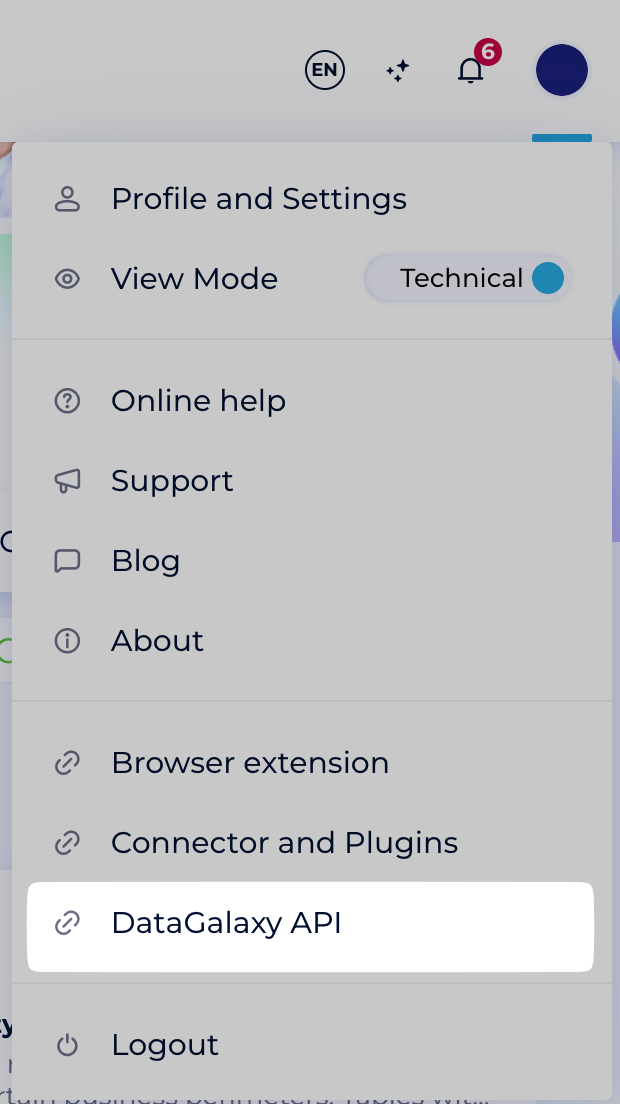
Find the API URL
- Open your company's DataGalaxy Catalog platform.
- Click your profile in the top-right corner.
- Select DataGalaxy API.
- Copy the displayed URL.
Configure Polling
The polling object has three options:
cron: a cron expression that defines when polling runs. Use a site such as crontab.guru to help write it.
timezone(optional):- If not specified, UTC will be used by default.
- Valid timezones are:
Valid timezone
Timezone Africa/Abidjan Africa/Accra Africa/Addis_Ababa Africa/Algiers Africa/Asmara Africa/Bamako Africa/Bangui Africa/Banjul Africa/Bissau Africa/Blantyre Africa/Brazzaville Africa/Bujumbura Africa/Cairo Africa/Casablanca Africa/Ceuta Africa/Conakry Africa/Dakar Africa/Dar_es_Salaam Africa/Djibouti Africa/Douala Africa/El_Aaiun Africa/Freetown Africa/Gaborone Africa/Harare Africa/Johannesburg Africa/Juba Africa/Kampala Africa/Khartoum Africa/Kigali Africa/Kinshasa Africa/Lagos Africa/Libreville Africa/Lome Africa/Luanda Africa/Lubumbashi Africa/Lusaka Africa/Malabo Africa/Maputo Africa/Maseru Africa/Mbabane Africa/Mogadishu Africa/Monrovia Africa/Nairobi Africa/Ndjamena Africa/Niamey Africa/Nouakchott Africa/Ouagadougou Africa/Porto-Novo Africa/Sao_Tome Africa/Tripoli Africa/Tunis Africa/Windhoek America/Adak America/Anchorage America/Anguilla America/Antigua America/Araguaina America/Argentina/Buenos_Aires America/Argentina/Catamarca America/Argentina/Cordoba America/Argentina/Jujuy America/Argentina/La_Rioja America/Argentina/Mendoza America/Argentina/Rio_Gallegos America/Argentina/Salta America/Argentina/San_Juan America/Argentina/San_Luis America/Argentina/Tucuman America/Argentina/Ushuaia America/Aruba America/Asuncion America/Atikokan America/Bahia America/Bahia_Banderas America/Barbados America/Belem America/Belize America/Blanc-Sablon America/Boa_Vista America/Bogota America/Boise America/Cambridge_Bay America/Campo_Grande America/Cancun America/Caracas America/Cayenne America/Cayman America/Chicago America/Chihuahua America/Costa_Rica America/Creston America/Cuiaba America/Curacao America/Danmarkshavn America/Dawson America/Dawson_Creek America/Denver America/Detroit America/Dominica America/Edmonton America/Eirunepe America/El_Salvador America/Fort_Nelson America/Fortaleza America/Glace_Bay America/Godthab America/Goose_Bay America/Grand_Turk America/Grenada America/Guadeloupe America/Guatemala America/Guayaquil America/Guyana America/Halifax America/Havana America/Hermosillo America/Indiana/Indianapolis America/Indiana/Knox America/Indiana/Marengo America/Indiana/Petersburg America/Indiana/Tell_City America/Indiana/Vevay America/Indiana/Vincennes America/Indiana/Winamac America/Inuvik America/Iqaluit America/Jamaica America/Juneau America/Kentucky/Louisville America/Kentucky/Monticello America/Kralendijk America/La_Paz America/Lima America/Los_Angeles America/Lower_Princes America/Maceio America/Managua America/Manaus America/Marigot America/Martinique America/Matamoros America/Mazatlan America/Menominee America/Merida America/Metlakatla America/Mexico_City America/Miquelon America/Moncton America/Monterrey America/Montevideo America/Montserrat America/Nassau America/New_York America/Nipigon America/Nome America/Noronha America/North_Dakota/Beulah America/North_Dakota/Center America/North_Dakota/New_Salem America/Ojinaga America/Panama America/Pangnirtung America/Paramaribo America/Phoenix America/Port_of_Spain America/Port-au-Prince America/Porto_Velho America/Puerto_Rico America/Punta_Arenas America/Rainy_River America/Rankin_Inlet America/Recife America/Regina America/Resolute America/Rio_Branco America/Santarem America/Santiago America/Santo_Domingo America/Sao_Paulo America/Scoresbysund America/Sitka America/St_Barthelemy America/St_Johns America/St_Kitts America/St_Lucia America/St_Thomas America/St_Vincent America/Swift_Current America/Tegucigalpa America/Thule America/Thunder_Bay America/Tijuana America/Toronto America/Tortola America/Vancouver America/Whitehorse America/Winnipeg America/Yakutat America/Yellowknife Antarctica/Casey Antarctica/Davis Antarctica/DumontDUrville Antarctica/Macquarie Antarctica/Mawson Antarctica/McMurdo Antarctica/Palmer Antarctica/Rothera Antarctica/Syowa Antarctica/Troll Antarctica/Vostok Arctic/Longyearbyen Asia/Aden Asia/Almaty Asia/Amman Asia/Anadyr Asia/Aqtau Asia/Aqtobe Asia/Ashgabat Asia/Atyrau Asia/Baghdad Asia/Bahrain Asia/Baku Asia/Bangkok Asia/Barnaul Asia/Beirut Asia/Bishkek Asia/Brunei Asia/Chita Asia/Choibalsan Asia/Colombo Asia/Damascus Asia/Dhaka Asia/Dili Asia/Dubai Asia/Dushanbe Asia/Famagusta Asia/Gaza Asia/Hebron Asia/Ho_Chi_Minh Asia/Hong_Kong Asia/Hovd Asia/Irkutsk Asia/Jakarta Asia/Jayapura Asia/Jerusalem Asia/Kabul Asia/Kamchatka Asia/Karachi Asia/Kathmandu Asia/Khandyga Asia/Kolkata Asia/Krasnoyarsk Asia/Kuala_Lumpur Asia/Kuching Asia/Kuwait Asia/Macau Asia/Magadan Asia/Makassar Asia/Manila Asia/Muscat Asia/Nicosia Asia/Novokuznetsk Asia/Novosibirsk Asia/Omsk Asia/Oral Asia/Phnom_Penh Asia/Pontianak Asia/Pyongyang Asia/Qatar Asia/Qostanay Asia/Qyzylorda Asia/Riyadh Asia/Sakhalin Asia/Samarkand Asia/Seoul Asia/Shanghai Asia/Singapore Asia/Srednekolymsk Asia/Taipei Asia/Tashkent Asia/Tbilisi Asia/Tehran Asia/Thimphu Asia/Tokyo Asia/Tomsk Asia/Ulaanbaatar Asia/Urumqi Asia/Ust-Nera Asia/Vientiane Asia/Vladivostok Asia/Yakutsk Asia/Yangon Asia/Yekaterinburg Asia/Yerevan Atlantic/Azores Atlantic/Bermuda Atlantic/Canary Atlantic/Cape_Verde Atlantic/Faroe Atlantic/Madeira Atlantic/Reykjavik Atlantic/South_Georgia Atlantic/St_Helena Atlantic/Stanley Australia/Adelaide Australia/Brisbane Australia/Broken_Hill Australia/Currie Australia/Darwin Australia/Eucla Australia/Hobart Australia/Lindeman Australia/Lord_Howe Australia/Melbourne Australia/Perth Australia/Sydney Europe/Amsterdam Europe/Andorra Europe/Astrakhan Europe/Athens Europe/Belgrade Europe/Berlin Europe/Bratislava Europe/Brussels Europe/Bucharest Europe/Budapest Europe/Chisinau Europe/Copenhagen Europe/Dublin Europe/Gibraltar Europe/Guernsey Europe/Helsinki Europe/Isle_of_Man Europe/Istanbul Europe/Jersey Europe/Kaliningrad Europe/Kiev Europe/Kirov Europe/Lisbon Europe/Ljubljana Europe/London Europe/Luxembourg Europe/Madrid Europe/Malta Europe/Mariehamn Europe/Minsk Europe/Monaco Europe/Moscow Europe/Oslo Europe/Paris Europe/Podgorica Europe/Prague Europe/Riga Europe/Rome Europe/Samara Europe/San_Marino Europe/Sarajevo Europe/Saratov Europe/Simferopol Europe/Skopje Europe/Sofia Europe/Stockholm Europe/Tallinn Europe/Tirane Europe/Ulyanovsk Europe/Uzhgorod Europe/Vaduz Europe/Vatican Europe/Vienna Europe/Vilnius Europe/Volgograd Europe/Warsaw Europe/Zagreb Europe/Zaporozhye Europe/Zurich Indian/Antananarivo Indian/Chagos Indian/Christmas Indian/Cocos Indian/Comoro Indian/Kerguelen Indian/Mahe Indian/Maldives Indian/Mauritius Indian/Mayotte Indian/Reunion Pacific/Apia Pacific/Auckland Pacific/Bougainville Pacific/Chatham Pacific/Chuuk Pacific/Easter Pacific/Efate Pacific/Enderbury Pacific/Fakaofo Pacific/Fiji Pacific/Funafuti Pacific/Galapagos Pacific/Gambier Pacific/Guadalcanal Pacific/Guam Pacific/Honolulu Pacific/Kiritimati Pacific/Kosrae Pacific/Kwajalein Pacific/Majuro Pacific/Marquesas Pacific/Midway Pacific/Nauru Pacific/Niue Pacific/Norfolk Pacific/Noumea Pacific/Pago_Pago Pacific/Palau Pacific/Pitcairn Pacific/Pohnpei Pacific/Port_Moresby Pacific/Rarotonga Pacific/Saipan Pacific/Tahiti Pacific/Tarawa Pacific/Tongatapu Pacific/Wake Pacific/Wallis
forceSyncOnConfigurationUpdate(optional): if empty ortrue, the connector runs a synchronization each time the configuration is updated. Iffalse, synchronization follows only the cron schedule.
Find the Workspace ID
- Open your company's DataGalaxy Catalog platform.
- Open the workspace you need.
- Read the
workspaceIdfrom the browser address bar. It is the UUID immediately afterspace/. For example, theworkspaceIdin the following URL is17eefa1c-9ca2-4083-b4ae-d5c7a7ebd094:Example workspace URL:
https://dkw.datagalaxy.com/#/client/ccd4ddc5-2236-4df2-b028-c7041a48e5ef/space/17eefa1c-9ca2-4083-b4ae-d5c7a7ebd094/49fc80fa-6837-4791-9768-e4771a973bb8/home
Select a Workspace Version
The optional workspaceVersionId option selects the workspace version to use. If you do not set it, the connector uses the default workspace version defined in DataGalaxy Catalog. Retrieve version IDs with the GetVersions API endpoint.
Configure Links
If getLinks is true (the default is false), the connector adds an n-n association for the object's links to the mapping. It includes only links whose target type appears once in the configuration.
Use linkMode (the default is sync) to choose how the connector synchronizes these associations:
sync: synchronize in both directions, DataGalaxy Portfolio → DataGalaxy Catalog and DataGalaxy Catalog → DataGalaxy Portfolio.
write: take into account only updates from DataGalaxy Catalog to DataGalaxy Portfolio.
read: take into account only updates from DataGalaxy Portfolio to DataGalaxy Catalog.
Choose a Configuration Type
The connector supports two configuration types: flat and non-flat.
Flat Configuration
- Description: Used when the tree (parent/child representation) of DataGalaxy Catalog is not synchronized with DataGalaxy Portfolio. Instances are synchronized independently, without representing their position in the DataGalaxy Catalog hierarchy.
- Filters: Supported to determine which DataGalaxy Catalog instances should be synchronized.
- Limitations: Creation from DataGalaxy Portfolio → DataGalaxy Catalog is not supported because DataGalaxy Catalog requires a tree representation.
Non-Flat Configuration
- Description: Used when the tree structure is synchronized and mandatory in DataGalaxy Portfolio. The tree is represented by an embedding or an association n-1 field on the parent, which must be mapped in DataGalaxy Portfolio to the corresponding field. If this field is not mapped, no children of the given parent will be synchronized.
- Example: To synchronize Use Cases (children) with their Initiatives (parents), both objects must be declared in the JSON configuration. Since the connector recognizes that Use Cases can be embedded within Initiatives, an embedding field will automatically be proposed in the Initiatives mapping.
- Filters: Not supported.
- Scope: All parents and children must belong to the same workspace.
Choose a Data Type
The dataType is required when applicable. It corresponds to EntityType in DataGalaxy Catalog and tells the connector which type of instances will be synchronized. For some types, such as usages, the type is implicit and dataType is not required.
The following table lists the supported configuration types and values.
| Flat type | Non-flat type | dataType |
|---|---|---|
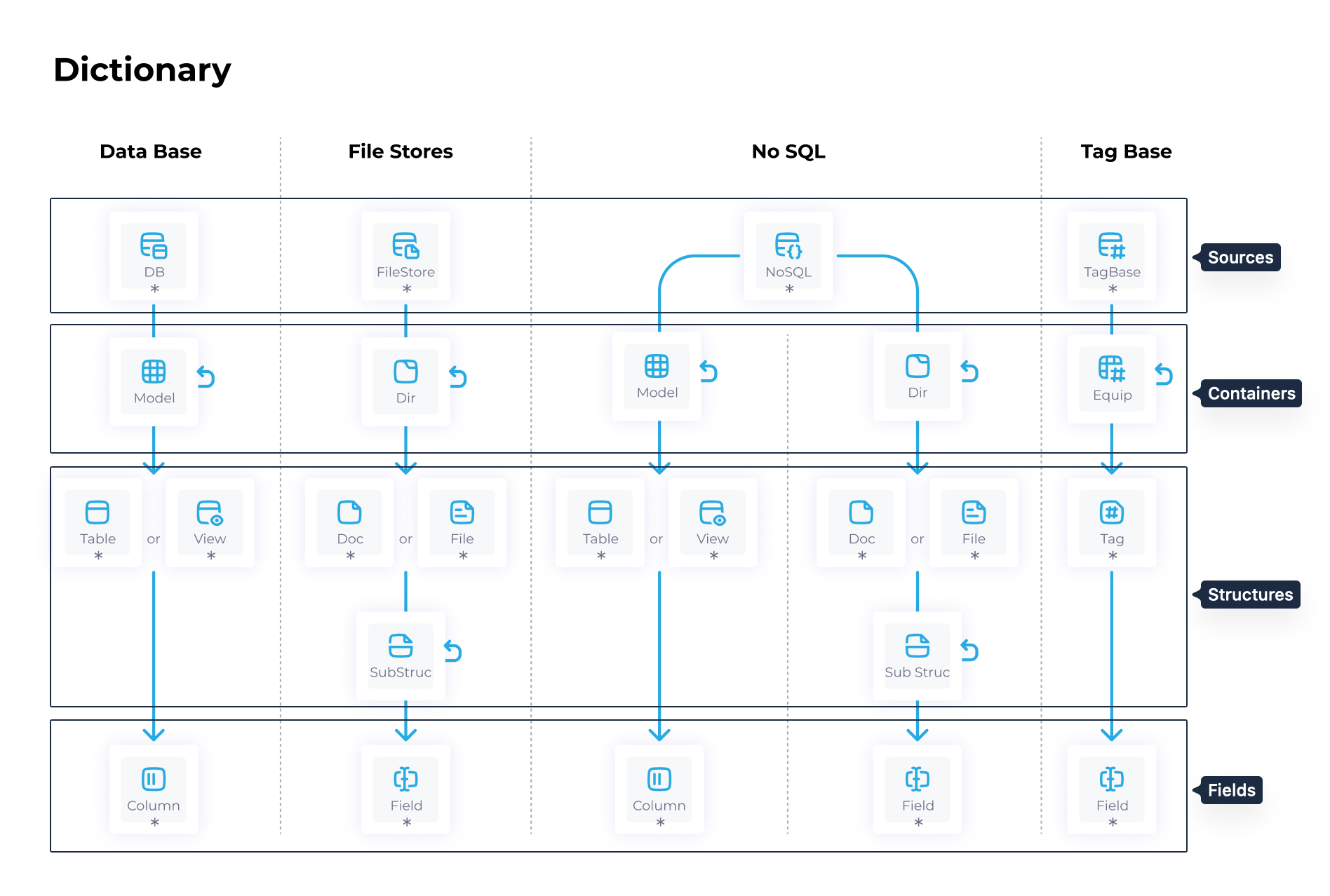
flat-dictionary | dictionary | sources, containers, structures, or fields |
flat-usages | usages | usage. The connector synchronizes and creates all usage types. To enable creation, synchronize and fill in the Type field. |
flat-strategy | strategy | useCases, initiatives, or objectives |
flat-product | product | dataProducts or aiProducts |
flat-governance | governance | policies, rules, or monitors |
flat-glossary | glossary | properties |
flat-dataProcessing | dataProcessing | dataProcessing. Data processing items (DPI) are unavailable and not synchronized. |
For the dictionary type, use the data types shown in the following image.
Define the Configuration Model
Each configuration follows this model:
Example configuration model:
{
  "configurationKey": {
    "name": "Container",
    "type": "flat-dictionary",
    "workspace": "workspaceId",
    "dataType": "containers",
    "parentYOOIType": "association", // "association" or "embedding" ("embedding" per default)
    "makeObsoleteInsteadOfDeleting": false, //true per default
    "getLinks": true, // false per default
    "linkMode": "sync", // 'sync', 'write' or 'read'
    "{name of the dataType}": {
      "filters": [], // only applicable if type is flat
      "linkFilters": [], // only applicable if type is flat and getLinks is true
      "attributes": []
    }
  }
}
Use the following table to review the configuration options.
| Option | Description | Default |
|---|---|---|
configurationKey | Unique key of the configuration, used internally as its ID. | — |
name | Display name used in the mapping. | — |
parentYOOIType | Whether the parent is an embedding or association field in DataGalaxy Portfolio. | embedding |
makeObsoleteInsteadOfDeleting | Sets the DataGalaxy Catalog object to Obsolete instead of deleting it; see Delete Objects. | true |
getLinks | Adds the object's links to the mapping; see Configure Links. | false |
linkMode | sync, write, or read; see Configure Links. | sync |
filters | Filters on object attributes. Flat configurations only. | — |
linkFilters | Filters on links. Flat configurations only, with getLinks set to true. | — |
attributes | Attributes to synchronize; see Configure Attributes. | All attributes |
Configure Filters and Link Filters
Use filters only in flat configurations. DataGalaxy Catalog instance count tends to be high, and you probably don't want to add all of them to your DataGalaxy Portfolio instance. To avoid that, the configuration allows you to define a list of filters to apply to each of your configurations:
filtersapply to object attributes.
linkFiltersapply to links between objects. Use them only whengetLinksistrue.
Each filter has three parameters:
attribute: the attribute or link key to filter.
condition:- For most attributes:
EQUALS,NOT_EQUALS,IS_EMPTY, orIS_NOT_EMPTY.
- For multi-value relation attributes (
ManagedTag,MultiValueList,UserReference, andStewardUserReference) and link filters:EQUALS,NOT_EQUALS,CONTAIN,CONTAIN_SOME,DO_NOT_CONTAIN,IS_EMPTY, orIS_NOT_EMPTY.
- For most attributes:
value: the value to test, such as an array for multi-value relation attributes or a number for number attributes. ForlinkFilters, use the DataGalaxy Catalog object ID in the formatVersionId:ObjectId.
The connector combines all filters in the list with AND.
Configure Attributes
The configuration can be enriched with an optional list of attributes to synchronize. Each entry has the following parameters:
key: the DataGalaxy Catalog attribute key. Get it with the GetAttributes API endpoint.
label(optional): the label used in the mapping. If empty, the connector uses the attribute's own label.
mode(optional):syncby default when the attribute can be edited in DataGalaxy Catalog, andreadotherwise.sync: synchronize in both directions, DataGalaxy Portfolio → DataGalaxy Catalog and DataGalaxy Catalog → DataGalaxy Portfolio.
write: take into account only updates from DataGalaxy Catalog to DataGalaxy Portfolio.
read: take into account only updates from DataGalaxy Portfolio to DataGalaxy Catalog.
If you do not set an attribute list, the connector shows all DataGalaxy Catalog attributes in the mapping. Because a workspace has many attributes, list only the ones you need to make the mapping easier to read and the connector more efficient.
For non-flat configurations, the connector automatically adds embedding fields to the mapping of the parent concepts.
Map Fields and Instances
DataGalaxy Catalog dictionaries and usages can be mapped to DataGalaxy Portfolio instances. To display the mapping section for the first time, a valid JSON configuration is required.
Choose Supported Field Types
Currently, the following field types can be mapped: Text, EntityLogicalPathString, Boolean, Number, ValueList, SystemEntityType, ManagedTag, UserReference, StewardUserReference, MultiValueList, HtmlLink, FormattedText, and, when applicable, Embedding.
Map Single-Value Relations
For single-value relation attributes (such as ValueList and SystemEntityType), two types of mappings can be defined: one for mapping the value to an n-1 relation field, and another for mapping it within a workflow. You should choose only one of these mappings and disregard the other. Mapping both is not recommended, as it can lead to unpredictable behavior when syncing from DataGalaxy Portfolio to DataGalaxy Catalog.
Map Association Fields
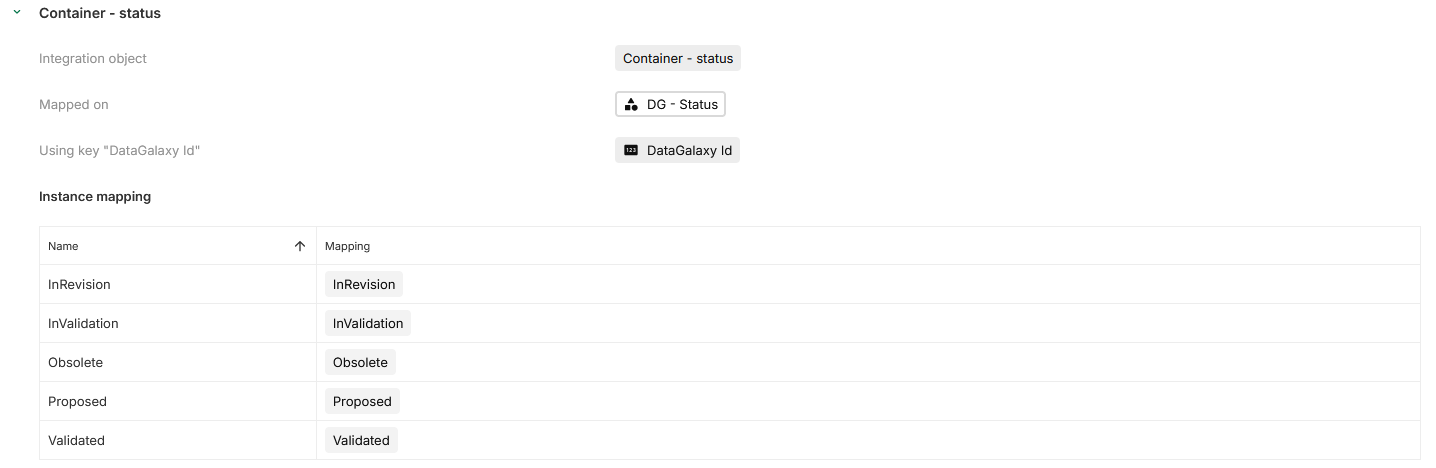
For each configured association field, the connector creates a mapping section to match instances. This matching process ensures that each DataGalaxy Catalog instance corresponds to the correct instance in DataGalaxy Portfolio.
The primary tool for this mapping is the externalKey field.
The mapping table is both a visual aid for seeing which instance maps to which value and an editing tool: selecting a DataGalaxy Portfolio instance in the table fills its key field with the correct value.
If the keys are already filled in DataGalaxy Portfolio, the connector maps the instances automatically.
Review Editable Attributes in DataGalaxy Catalog
Not all attributes can be updated in DataGalaxy Catalog. The following table lists the attributes that can be changed for each data type. The connector ignores other attributes when updating from DataGalaxy Portfolio to DataGalaxy Catalog, even if they are set to sync or read.
dataType | Editable attributes | Notes |
|---|---|---|
| Sources | Name, Description, Owners, Status, Stewards, Summary, Tags, ExternalUrl, Type, custom properties | Type and TechnicalName are not editable, but are required to identify and update a DataGalaxy source instance. They must always be included in the attribute mapping with DataGalaxy Portfolio for the connector to function properly. |
| Fields | Name, Description, Owners, Status, Stewards, Summary, Tags, TechnicalName, ExternalUrl, Type, ColumnDataType (required), Size (required) | ColumnDataType and Size are required when updating a Field instance. They must always be included in the attribute mapping with DataGalaxy Portfolio for the connector to function properly and be set to sync or read. |
| Objectives, initiatives, data products, AI products, policies, rules, monitors, containers, structures, data processing, glossary | Name, Description, Owners, Status, Stewards, Summary, Tags, TechnicalName, ExternalUrl, Type, custom properties | — |
| Usages | Name, Description, Owners, Status, Stewards, Summary, Tags, TechnicalName, ExternalUrl, Type, ParentId | — |
TechnicalNamemust be unique perdataTypein DataGalaxy Catalog.
- Only specific users can be
StewardsorOwnersin DataGalaxy Catalog. If a user assigned in DataGalaxy Portfolio is not eligible, the connector rejects the update.