Configure intentions
Platform intentions configuration
In Settings > Collaboration, you can define and configure the intentions available on the platform. By default, the intentions defined at the platform level are activated for all concepts.
Concept intention configuration
For each concept, the available intentions can be configured under the Collaboration tab.
Add a Subscriptions widget
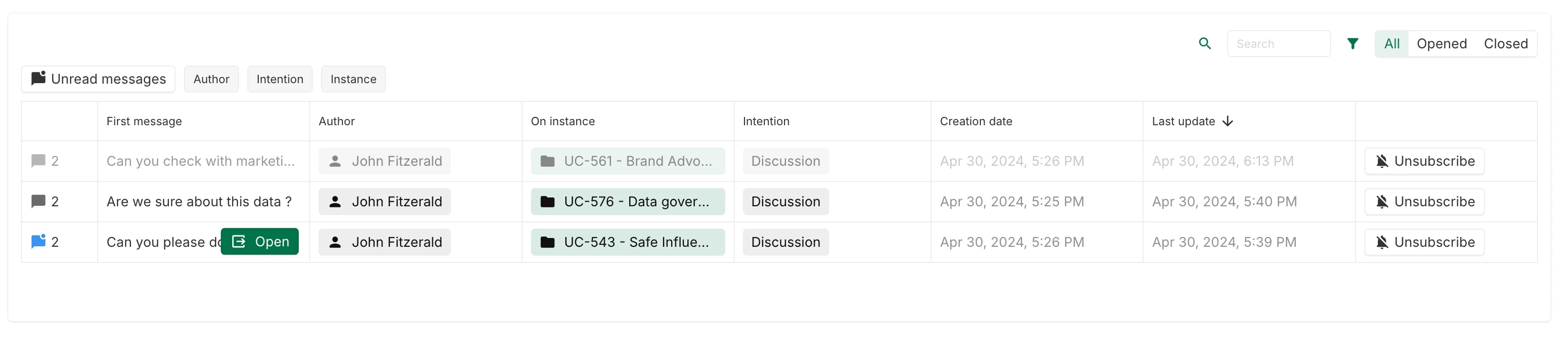
A Subscriptions widget can be displayed on dashboards (Content > Type > Subscriptions).
All the collaborations that the users have subscribed to are listed on that widget:
Use the Collaboration field
The Collaboration field is available by default on each concept (like the Name or Description field, for example).
It can be used:
- For display. It has the same behavior as the collaboration button in the header of instances: it displays all the open collaborations for the given instance. It can be used like any other field when configuring views.

- For computing. Like other fields, this field can be used in computing. It returns the number of open collaborations for the given instance.