Start a collaboration
Create an instance collaboration

- This button, located on the right side of the header, displays all the open collaborations for the current instance. A blue state indicates that there are unread messages.
- It is possible to create a new collaboration on the instance via this button. Those collaborations are not linked to a field.
Create a field collaboration

- This button is displayed at the end of every field title and can have 3 states:
Grey state(appearing only on hover): when no collaboration is open on the hovered field.
Black state: appears when at least one collaboration is open on the hovered field.
Blue state: appears when there is at least one open and unread collaboration on the hovered field.
- Clicking on this button opens the collaboration thread of the selected field, and it is possible to create a new collaboration on this field. The selected field will also be highlighted.

Use the Collaboration field
See here.
Get notified
Read notifications
- The notifications are available on the top right of the screen, everywhere in the application.

- When clicking on the notifications icon, a panel displays the user notifications.
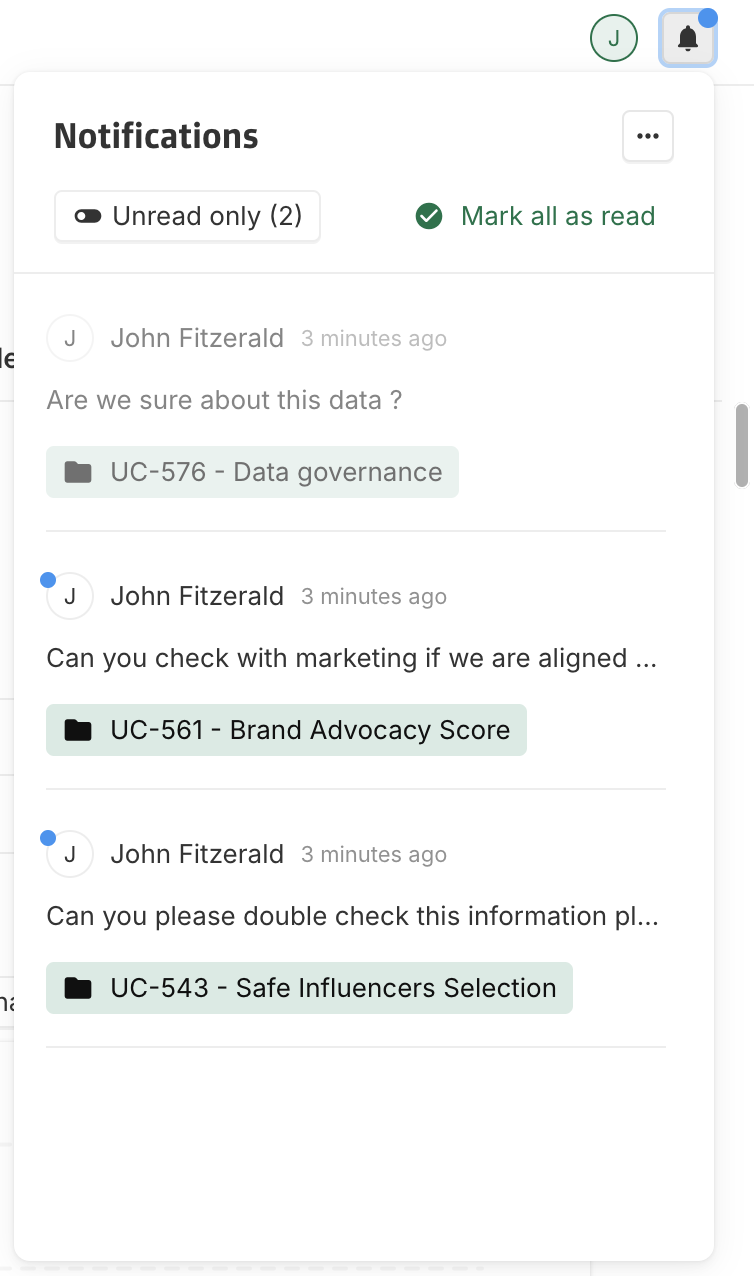
- In the notifications list, read notifications are displayed as faded, while unread ones have a distinct blue chip. Clicking on a notification will navigate to the associated collaboration.
Use the Subscriptions widget
See here.
Receive email notifications
See Send Email Notifications for Collaboration Messages.