It is possible to send emails when a new message is sent on a collaboration. To do this, Automation is used. (Settings > Automation).
Configure the automation
A new automation needs to be created, following those steps:
- For Trigger Type, Listen to Collaboration(s) must be selected. It is then possible to restrict the concepts and the intention(s).
- For Action, Send an email must be selected.
- For To, User > Collaboration recipients can be selected. Collaboration recipients are the subscribers defined in the collaboration, minus the user that has sent the new message (User > Collaboration message author).
- The Subject and the Body need to be filled in.
Use the email template
For Subject and Body, the following template can be chosen (the template can be adapted with different colours and a different language or text):
Template rendering
Review the first message
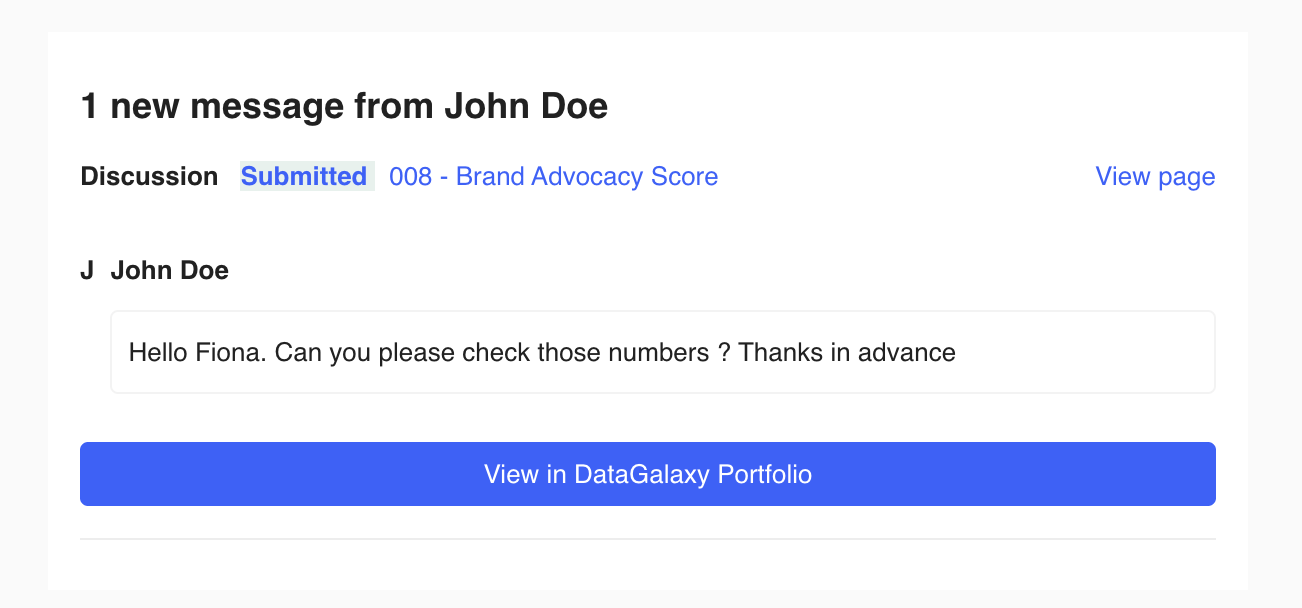
Review the second to fourth messages
Review the fifth message and later
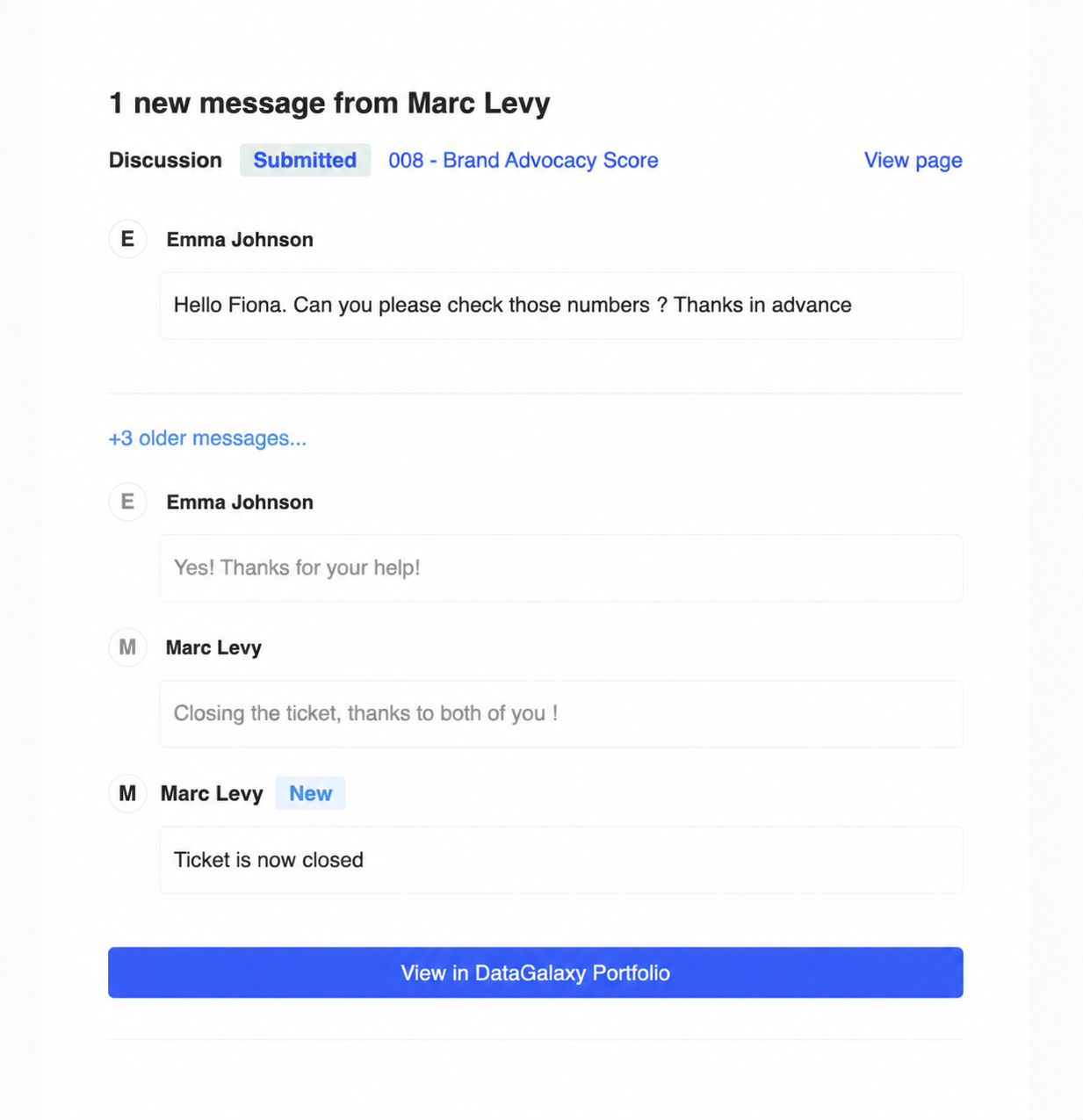
Template configuration
Set the subject
1 new message from {{ collaboration_message.author }}Set the body
{%set i18n = {
'1 new message from': '1 new message from',
'View page': 'View page',
'older messages': 'older messages',
'View in DataGalaxy Portfolio': 'View in DataGalaxy Portfolio',
'New': 'New'
} %}
{%set color = {
'primary': '#3d5cfe',
'secondary': '#f3f6ff'
} %}
{% set hostname = 'https://yooi.yooi.io' %}
{% set first_message = collaboration.messages | first %}
{% set messages_count = collaboration.messages.length %}
{% macro renderViewButton() %}
<tr id="button">
<td style="background-color:{{ color.primary }};border-radius:8px;text-align:center" valign="top">
<a
href="{{ hostname }}{{ collaboration.uri}}"
target="_blank"
style="background-color:{{ color.primary }};border-radius:4px;border:1px solid {{ color.primary }};color:#ffffff;display:block;font-weight:normal;font-style:normal;padding: 4px;text-decoration:none;min-width:30px;text-align:center;"
>
{{ i18n['View in DataGalaxy Portfolio'] }}
</a>
</td>
</tr>
{% endmacro %}
{% macro renderMessage(authorName, message, isNew, isFaded) %}
{% if isFaded %}
<tr class="faded">
{% else %}
<tr>
{% endif %}
<td>
<table border="0" cellpadding="0" cellspacing="0" width="100%">
<tbody>
<tr>
<td>
<table border="0" cellpadding="0" cellspacing="0" width="100%" style="border-collapse: separate;border-spacing: 0 8px;">
<tbody>
<tr style="line-height: 24px;">
<td class="circle" style="font-weight: bolder;">{{ authorName | first | upper }}</td>
<td valign="top" style="width: 100%;padding-left: 8px;font-weight: bolder;text-align: left;">
{{ authorName }}
{% if isNew %}
<span class="newTag">{{ i18n['New'] }}</span>
{% endif %}
</td>
</tr>
<tr style="line-height: 24px;">
<td>
</td>
<td valign="top" style="text-align: left;display: block;border: solid 1px #f3f3f3;vertical-align: middle;border-radius: 4px;margin-left: 8px;padding: 8px;">
{{ message }}
</td>
</tr>
</tbody>
</table>
</td>
</tr>
</tbody>
</table>
</td>
</tr>
{% endmacro %}
<!doctype html>
<html>
<head>
<meta property="og:title" content="{{ collaboration_message.author }}">
<meta name="viewport" content="width=device-width, initial-scale=1, maximum-scale=1">
<meta name="referrer" content="origin">
<meta charset="UTF-8">
<meta http-equiv="X-UA-Compatible" content="IE=edge">
<meta name="viewport" content="width=device-width, initial-scale=1">
<title>{{ collaboration_message.author }}</title>
<link rel="stylesheet" href="https://fonts.googleapis.com/css?family=Inter:400,500,700">
<style type="text/css">
table {
border: 0;
border-spacing: 0;
border-collapse: collapse;
}
a {
text-decoration: none;
}
a:hover {
text-decoration: underline;
}
.faded td {
color: #999999;
}
.newTag {
border-radius: 3px;
display: inline-block;
padding: 0 8px;
line-height: 20px;
color: #3892F3;
background-color: #EBF4FE;
}
@media (prefers-color-scheme: dark) {
.newTag {
border-radius: 3px;
display: inline-block;
padding: 0 8px;
line-height: 20px;
color: #3892F3;
background-color: #EBF4FE !important;
}
}
.tag {
border-radius: 3px;
display: inline-block;
padding: 0 8px;
line-height: 20px;
}
.mceButton a {
min-width: 0 !important;
}
.mcnPreviewText {
display: none !important;
font-size: 0;
line-height: 0;
max-height: 0;
max-width: 0;
opacity: 0;
overflow: hidden;
visibility: hidden;
mso-hide: all;
}
td.circle {
display: table-cell;
vertical-align: middle;
min-width: 22px;
border: solid 1px #EDEDED;
width: 22px;
height: 22px;
line-height: 22px;
text-align: center;
border-radius: 50%;
}
.paddedContainer {
padding: 24px;
}
@media only screen and (max-width: 500px) {
.paddedContainer {
padding: 0;
}
}
</style>
</head>
<body style="height: 100%;margin: 0;padding: 0;width: 100%;background-color: #FAFAFA;font-family: Inter, Helvetica, sans-serif;font-size: 13px;line-height: 22px;">
<!---->
<!--[if !gte mso 9]><!---->
<span class="mcnPreviewText">{{ collaboration.instance_label}}</span>
<!--<![endif]-->
<!---->
<center>
<table
align="center"
border="0"
cellpadding="0"
cellspacing="0"
height="100%"
width="100%"
id="bodyTable"
style="border-collapse: collapse;height: 100%;margin: 0;padding: 0;width: 100%;background-color: #FAFAFA;"
>
<tbody>
<tr>
<td
align="center"
valign="top"
id="bodyCell"
style="height: 100%;margin: 0;padding: 10px;width: 100%;border-top: 0;"
>
<table
border="0"
cellpadding="0"
cellspacing="0"
width="100%"
style="border-collapse: collapse;border: 0;max-width: 600px !important;"
>
<tbody>
<tr>
<td class="paddedContainer" valign="top" id="paddedContent" style="background:#FFFFFF;">
<table border="0" cellpadding="0" cellspacing="0" width="100%" class="templateContainer" style="border-collapse: separate;border-spacing: 16px;">
<tbody>
<tr>
<td valign="top" id="templateHeader">
<table border="0" cellpadding="0" cellspacing="0" width="100%" style="min-width: 100%;border-collapse: collapse;">
<tbody class="mcnTextBlockOuter">
<tr>
<td valign="top" class="mcnTextBlockInner" style="padding-top: 9px;">
<table
align="left"
border="0"
cellpadding="0"
cellspacing="0"
style="max-width: 100%;min-width: 100%;border-collapse: collapse;"
width="100%"
>
<tbody>
<tr>
<td
valign="top"
style="padding-top: 0;padding-right: 0;padding-bottom: 12px;padding-left: 0;font-size: 18px;font-weight: bold;text-align: left;line-height: 24px;"
>
{{ i18n['1 new message from'] }} {{ collaboration_message.author.toString() }}
</td>
</tr>
<tr>
<td valign="top" style="padding-top: 0;padding-bottom: 16px;font-weight: bolder;text-align: left;line-height: 22px;">
{{ collaboration.intention }}
<span class="tag" style="color:{{ color.primary }}; background-color:{{ color.secondary }};">
{{ collaboration.status }}
</span>
<a style="color:{{ color.primary }};font-weight: normal" href="{{ hostname }}{{ collaboration_message.uri}}" target="_blank">{{collaboration.instance_label}}</a>
</td>
<td valign="top" style="padding-bottom: 16px;text-align: right;line-height: 22px;">
<a style="color:{{ color.primary }};font-weight: normal" href="{{ hostname }}{{ collaboration_message.uri}}" target="_blank">
{{ i18n['View page'] }}
</a>
</td>
</tr>
</tbody>
</table>
</td>
</tr>
</tbody>
</table>
<table border="0" cellpadding="0" cellspacing="0" width="100%">
<tbody>
{{ renderMessage(first_message.author.toString(), first_message.text, false, false) }}
</tbody>
</table>
</td>
</tr>
{% if messages_count === 1 %}
{{ renderViewButton() }}
{% endif %}
{% if messages_count > 1 %}
<tr>
<td valign="top" id="templateBody" style="background:#FFFFFF;padding-top: 9px;padding-bottom: 9px;">
<table border="0" cellpadding="0" cellspacing="0" width="100%" style="border-top: solid 1px #ededed;">
<tbody>
<tr>
<td style="height: 8px;"></td>
</tr>
{% if messages_count > 4 %}
<tr>
<td valign="top" style="font-weight: normal;text-align: left;word-break: break-word;padding: 8px 0;">
<a href="{{ hostname }}{{ collaboration.uri}}" target="_blank" style="color: #3892F3;">
+{{ messages_count - 4 }} {{ i18n['older messages'] }}...
</a>
</td>
</tr>
{% endif %}
{% for message in collaboration.messages %}
{% if loop.index !== 1 and loop.index > loop.length - 3 %}
{{ renderMessage(message.author.toString(), message.text, loop.index === loop.length, loop.index !== loop.length) }}
{% endif %}
{% endfor %}
<tr>
<td style="height: 24px;"></td>
</tr>
{{ renderViewButton() }}
</tbody>
</table>
</td>
</tr>
{% endif %}
<tr>
<td valign="top" id="templateFooter" style="background:#FFFFFF;padding-top: 9px;border-top: 1px solid #ededed;"></td>
</tr>
</tbody>
</table>
</td>
</tr>
</tbody>
</table>
</td>
</tr>
</tbody>
</table>
</center>
</body>
</html>Set the hostname
{% set hostname = 'https://yooi.yooi.io' %}Change the text
This part can be easily configured:
{%set i18n = {
'1 new message from': '1 new message from',
'View page': 'View page',
'older messages': 'older messages',
'View in DataGalaxy Portfolio': 'View in DataGalaxy Portfolio',
'New': 'New'
} %}Alternatively, the text can be changed, for example:
{%set i18n = {
'1 new message from': '1 nouveau message de',
'View page': 'Voir la page',
'older messages': 'ancien(s) message(s)',
'View in DataGalaxy Portfolio': 'Voir dans DataGalaxy Portfolio',
'New': 'Nouveau'
} %}
Change the colors
This part can be easily configured to match the company colour:
{%set color = {
'primary': '#007348',
'secondary': '#E6F1ED'
} %}FAQ Collaboration email automation
Are emails still sent when a collaboration is closed?
Yes, the Listen to collaboration(s) trigger works, even if the collaboration is closed. It is possible to find out the status of the collaboration via the variables available in automation ({{ collaboration.status }}), so the email visual can be modified if that's what is required.